Posts in Category: Ubuntu
Proxy using SSH Tunnel
Browse the web using your SSH Server by making it a proxy server

Continue reading
htop

htop is an interactive text-mode system-monitor process viewer for GNU/Linux. It aims to be a better ‘top’. It shows a frequently updated list of the processes running on a computer, normally ordered by the amount of CPU usage. Unlike top, htop provides a full list of processes running, instead of the top resource-consuming processes. htop uses color and gives visual information about processor, swap and memory status.
Apache restrict access based on IP address to selected directories
 Apache web server allows server access based upon various conditions. For example you just want to restrict access to url http://subdomain.domain.com/ (mapped to /var/www/subdomain directory) from 192.168.1.0/24 network (within intranet).
Apache provides access control based on client hostname, IP address, or other characteristics of the client request using mod_access module.
How to solve “Falling back to the standard locale” in ubuntu
 Sometimes you can get a error like this:
perl: warning: Setting locale failed.
perl: warning: Please check that your locale settings:
LANGUAGE = (unset),
LC_ALL = (unset),
LC_PAPER = “pt_BR.UTF-8”,
LC_ADDRESS = “pt_BR.UTF-8”,
LC_MONETARY = “pt_BR.UTF-8”,
LC_NUMERIC = “pt_BR.UTF-8”,
LC_TELEPHONE = “pt_BR.UTF-8”,
LC_IDENTIFICATION = “pt_BR.UTF-8”,
LC_MEASUREMENT = “pt_BR.UTF-8”,
LC_TIME = “pt_BR.UTF-8”,
LC_NAME = “pt_BR.UTF-8”,
LANG = “en_US.UTF-8”
are supported and installed on your system.
perl: warning: Falling back to the standard locale (“C”).
Press continue reading to understand how to fix this!
Powerful Redmine in AWS
In this post i will show how to make a installation of Redmine in AWS with some nice tools from AWS (EC2, RDS, S3, SES, ElastiCache) and making it auto scalable.
How to use different user and group for just one Virtual Host in Apache
With the mpm-itk that is a multi-processing module (MPM) you can run each virtualhost with it’s own user id and group id. This is basically used to make a shared hosting secured, since you don’t have to make all virtualhosts folders readeable by apache user.
mpm-itk is based on the traditional prefork MPM, which means it’s non-threaded; in short, this means you can run non-thread-aware code (like many PHP extensions) without problems.
How to fix “Can’t locate Search/Xapian.pm in @INC”
 Error: Can’t locate Search/Xapian.pm in @INC (you may need to install the Search::Xapian module) (@INC contains: /path/to/something /etc/perl /usr/local/lib/perl/5.18.2 /usr/local/share/perl/5.18.2 /usr/lib/perl5 /usr/share/perl5 /usr/lib/perl/5.18 /usr/share/perl/5.18 /usr/local/lib/site_perl .) at (eval 143) line 2. BEGIN failed–compilation aborted at (eval 143) line 2.
To fix this, in ubuntu 14.04, just type:
sudo apt-get install libsearch-xapian-perl
How to fix “Can’t locate Sort/Naturally.pm in @INC”
Can’t locate Sort/Naturally.pm in @INC (you may need to install the Sort::Naturally module) (@INC contains: /path/to/something /etc/perl /usr/local/lib/perl/5.18.2 /usr/local/share/perl/5.18.2 /usr/lib/perl5 /usr/share/perl5 /usr/lib/perl/5.18 /usr/share/perl/5.18 /usr/local/lib/site_perl .) at (eval 145) line 2.
BEGIN failed–compilation aborted at (eval 145) line 2.
To fix this, in ubuntu 14.04, just type:
sudo apt-get install libsort-naturally-perl
How to disable apache logs
To disable apache logs (access and error log) to avoid excessive writes on local server just open your /etc/apache2/apache2.conf file and change the following two configurations:
Change the ErrorLog to:
ErrorLog /dev/null
Now, open /etc/apache2/conf.d/other-vhosts-access-log and comment the following line
#CustomLog /var/log/apache2/other_vhosts_access.log vhost_combined
In addition, you might have to change these files:
/etc/apache2/sites-available/default-ssl
/etc/apache2/sites-available/default
and change the ErrorLog and comment out the CustomLog:
ErrorLog /dev/null
#CustomLog ${APACHE_LOG_DIR}/access.log combined
If you have more VirtualHosts, you need to make the same configuration for them.
Source; lleess
How to change timezone in ubuntu
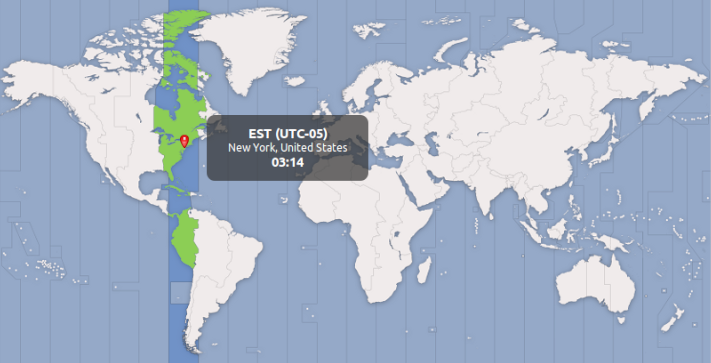
To change timezone in ubuntu, just use that in terminal:
sudo dpkg-reconfigure tzdata